How to Track Google Rankings at Scale with a SERP API (Bright Data)
Last updated: November 8, 2026. Product and pricing details were checked on brightdata.com on this date. Some links are affiliate links — see our Affiliate Disclosure. This article is not legal advice.
Rank tracking tools are convenient, but agencies and SEO teams with many keywords and markets often outgrow them. A SERP API returns search engine results on demand, so you can build your own tracker for any keyword, country or device. Here is a simple workflow using Bright Data’s SERP API.
Why Use a SERP API?
- Track rankings in many countries and cities from one setup
- Pay per successful request instead of per seat
- Store raw results to analyze SERP features over time
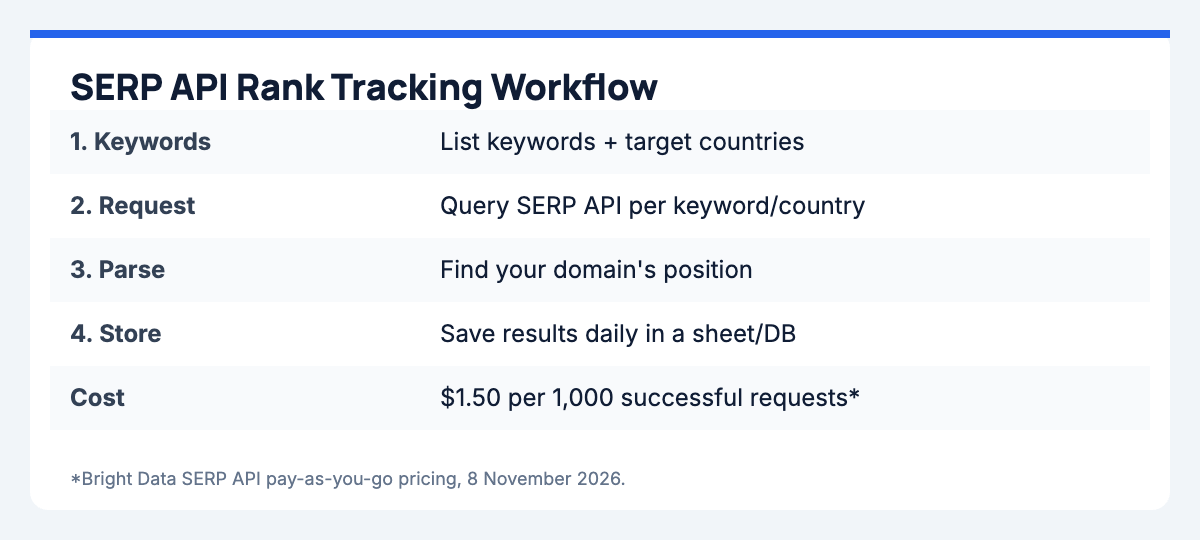
A Simple Rank Tracking Workflow
- Build your keyword list with the country (and city if needed) for each keyword.
- Schedule requests — for example once per day per keyword/country.
- Parse the results to find the position of your domain and competitors.
- Store and visualize results in a spreadsheet, database or dashboard.
- Alert on changes, such as drops of more than three positions.
Bright Data SERP API Pricing
| Plan | Price |
|---|---|
| Pay-as-you-go | $1.50 per 1,000 requests |
| Scale | $499/mo for 380K requests, then $1.30 per 1,000 |
Example: tracking 300 keywords in 2 countries once a day is about 18,000 requests per month — roughly $27 on pay-as-you-go at the listed rate. New accounts also get 5,000 free API credits each month to test.
Try the SERP API on Brightdata.comTips
- Track only keywords that matter commercially — every request costs money.
- Use consistent locations and devices so data is comparable over time.
- Keep raw responses for auditing SERP feature changes.
Related: Bright Data review · Web Unlocker guide.